Keyboard emulation
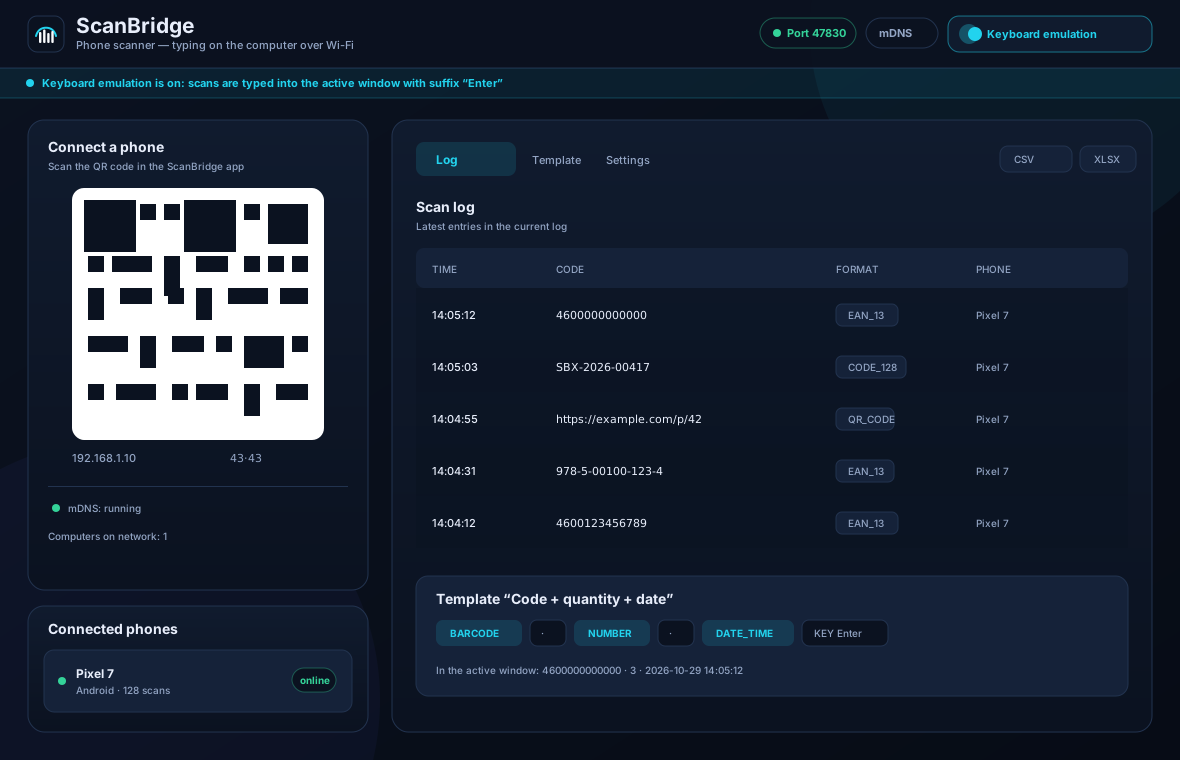
Unicode typing into the active window on Windows (SendInput) and Linux (XTest). Configurable suffix, delays and a character allowlist. Control characters from a barcode never become key presses.
ScanBridge turns an Android phone into a barcode scanner for Windows and Linux. Codes arrive over Wi-Fi in the active window, CSV or Excel — without an account, cloud or cables.
What already works
Fast start is a testable “Android + Windows/Linux” setup without code signing, a COM port or the cloud. Everything promised below is implemented in code; manual test results on real devices are published separately.
Unicode typing into the active window on Windows (SendInput) and Linux (XTest). Configurable suffix, delays and a character allowlist. Control characters from a barcode never become key presses.
Every scan goes straight into a file: CSV appends, atomic XLSX rewrites, optional UTF-8 BOM and protection against Excel formulas in untrusted data.
Barcode, text, quantity, date and time, phone name, key and delay. Components can be reordered by drag and drop and are synced to the phone.
Up to ten simultaneous connections to one PC. Each phone has its own session, log and counter, and scans are never mixed.
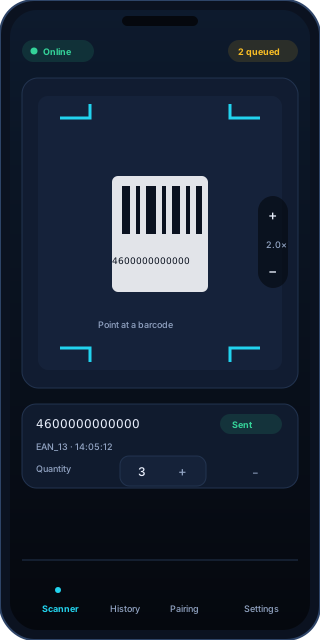
Scans are stored in SQLite until the PC acknowledges them, retried with exponential backoff and deduplicated by id. A Wi-Fi drop does not lose or duplicate codes.
A one-time token in a QR code, HMAC-signed messages and local network discovery. If mDNS is blocked, QR and manual address/token entry still work.
Three steps
Desktop for Windows or Linux and the Android APK. There is no code signing: Windows will show SmartScreen, Android will ask to allow installation from unknown sources.
On the PC, open the Pairing tab and show the QR code. The phone scans it with the camera and remembers the pair. The token is valid for 10 minutes.
Enable keyboard emulation and choose the active window. The code appears where a USB scanner would type it. Want a file? Enable CSV or XLSX.
Templates
A template is an ordered list of components. For the keyboard it becomes a sequence of text and keys; for CSV/XLSX it becomes row columns. Enter, Tab and other keys are pressed only from an explicitly added “Key” component.
4600000000000 · 3 · 2026-10-29 14:05:12Honest about limitations
Fast start is intentionally narrow. These limitations are not hidden in small print: they affect which platform and scenario you can use.
Download
We detect your OS automatically, but links for every platform are always available. Before installing, verify SHA-256 on the release page.
NSIS installer for Windows 10 and 11, 64-bit. Unsigned build: SmartScreen will show a warning — this is expected.
AppImage or deb for distributions with X11. Wayland is not supported: typing into other windows is restricted there.
APK for Android 9 and newer. Installed manually (sideload): allow installation from unknown sources for your file manager.
SHA-256 for every file is published on the release page. All files and checksums →
Detailed instructions with screenshots — on the download page.
Plan
FreeNo account, card or scan limit in this build
Paid plans and licenses will appear after stage 2. Until then there is nothing to buy: this build does not limit the number of scans and does not require the internet.
Coming next
The next stage direction: macOS and iOS, signed builds, a COM port, cloud mode and TLS. The order and timing depend on feedback from the first users.
A newsletter will appear after launch. For now, new versions, checksums and instructions are published on the release page.
FAQ
Not for scanning. The phone and computer must be on the same Wi-Fi/LAN; the internet is only needed to download the installers. There is no cloud mode in this version.
The installer and APK are not signed with paid certificates. Windows will show SmartScreen, Android will ask to allow installation from unknown sources. This is expected for a beta build; SHA-256 is published on the release page.
EAN-13, EAN-8, UPC-A, UPC-E, Code 128, Code 39, Code 93, ITF, Codabar, QR, Data Matrix, PDF417 and Aztec. Real recognition depends on the camera and ML Kit on a specific phone; acceptance testing covers EAN-13, Code 128 and QR.
Pairing uses a one-time token from the QR code with a 10-minute lifetime. Every message is signed with an HMAC key derived from the token. A barcode cannot press Ctrl/Alt/Win: keys come only from the template and control characters are removed. The channel is still ws:// inside the LAN without TLS — this limitation is explicit and planned to be fixed.
The phone keeps scans in a SQLite queue and retries with exponential backoff. The computer acknowledges and discards duplicates by id, so codes are neither lost nor duplicated.
Yes, up to ten at once. In the log and files every scan is labelled with the connected phone name.
On Wayland an app cannot synthesize input into other windows without special permissions (uinput/libei). Fast start supports X11; Wayland is a separate task for the next stage.
Locally: settings and log on the computer, queue and history on the phone. The site does not use advertising trackers; localStorage stores only the theme and consent flag. See theprivacy policy for details.
No. We implement the well-known “scan and send to PC” function with our own code, without third-party libraries, design, copy or protocol. The name, interface and wording were created for ScanBridge.
The source code is private. Releases, checksums and instructions are on GitHub Releases. If something does not work, include your phone model, OS version and steps — it will speed up the fix.